Google Ads is a powerful tool for online advertising, but many businesses unknowingly waste money due to common mistakes. Most agencies won’t openly discuss these issues, but understanding them can help you optimize your ad campaigns and get better results. Here are some of the most common Google Ads mistakes and how to fix them:
1. Avoid Relying on Google’s “Auto Apply” Recommendations
Google Ads offers an "Auto Apply" feature that automatically applies optimization suggestions to your campaign. While this sounds convenient, enabling it blindly can lead to problems like:
❌ Irrelevant Keywords – Google may add keywords that don’t align with your business, lowering traffic quality.
❌ Wasted Budget – Automated bidding adjustments might increase costs without boosting conversions.
❌ Uncontrolled Ad Copy Changes – Google may modify your ads, shifting away from your brand voice.
❌ Audience Expansion Risks – Google might broaden your audience, leading to irrelevant clicks.
✅ Best Practice:
🔹 Manually review all suggestions before applying them.
🔹 Regularly monitor campaign performance to ensure changes align with your goals.
🔹 Use a combination of manual optimization and data analysis for the best results.
💡 Key Takeaway: Auto Apply isn’t always the best option—stay in control of your campaign!
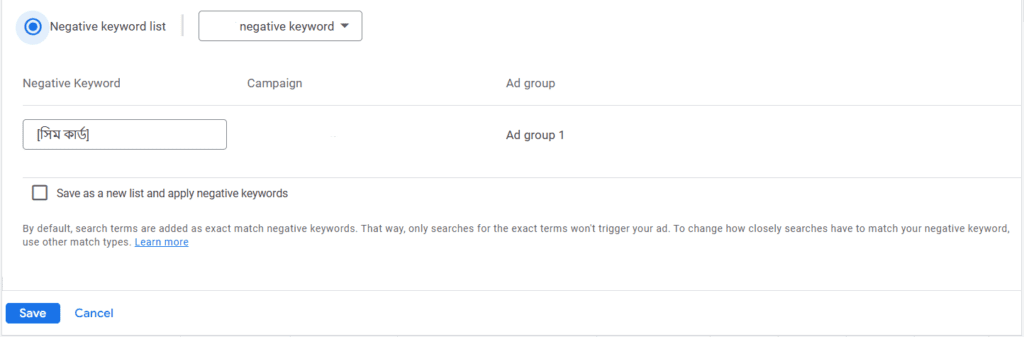
2. Ignoring Negative Keywords
❌ What Happens If You Don’t Use Negative Keywords?
Without negative keywords, your ads might appear for irrelevant searches, wasting your budget. For example, if you sell luxury watches, your ad might show up for searches like “free watches” or “second-hand watches.”
✅ How to Fix It:
✔ Regularly check your Search Terms Report to find irrelevant keywords.
✔ Add them to your Negative Keywords List to prevent wasted clicks.
✔ If you sell new products, exclude keywords like "used" or "second-hand."
💡 Pro Tip: Negative keywords help filter out unqualified traffic and improve conversion rates!
3. Poor Landing Page Optimization
❌ Common Mistakes:
🚫 Ignoring mobile users – Many businesses optimize for desktops but neglect mobile experiences.
🚫 Mismatched keywords – If your landing page doesn’t match your ad, users will leave quickly.
🚫 Slow load times – A slow page discourages visitors from staying and converting.
✅ How to Improve It:
✔ Ensure fast-loading, mobile-friendly landing pages with clear CTAs.
✔ Align your landing page content with your ad keywords for relevance.
✔ Use mobile-friendly ad extensions like call buttons for better engagement.
💡 Remember: A great ad is useless if your landing page isn’t optimized!
4. Not Testing Different Ad Creatives
❌ Why It’s a Problem:
Using the same ad copy and images for too long leads to Ad Fatigue—meaning people stop noticing your ads, lowering your CTR and conversions.
✅ Solution:
✔ Regularly test different versions of ad copy, images, and videos.
✔ Use A/B testing to find the best-performing combination.
✔ Refresh your creatives every few weeks to maintain engagement.
💡 New visuals keep your ads fresh and maximize results!
5. Incorrect Use of Keyword Match Types
❌ Why It’s a Problem:
Many businesses use Broad Match by default, which causes ads to show for loosely related searches. This wastes budget on unqualified clicks.
✅ How to Fix It:
✔ Use Phrase Match and Exact Match to target relevant searches.
✔ Regularly check your Search Terms Report to refine your keywords.
✔ Combine with Negative Keywords to filter out irrelevant traffic.
💡 More precise keyword matching = higher quality traffic & better ROI!
Running a successful Google Ads campaign isn’t just about spending money—it’s about spending smartly. Avoiding these common mistakes can significantly improve your ad performance, reduce wasted budget, and boost conversions.